1 Florida Real Estate in 360º
You have arrived at this page because your inability
to see Java (no, it is not coffee)
It is either not enabled or installed. This can be corrected by doing the following.
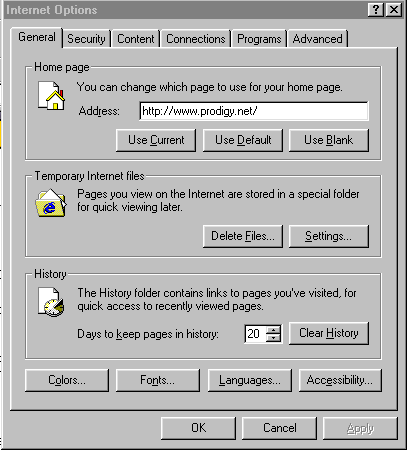 |
Click the Tools Button at the top of your Browser and this should appear |
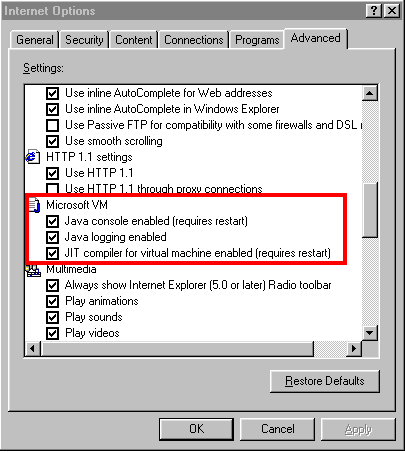 |
Then click on the Advanced Tab and scroll down to the following area and make sure these 3 are checked. If they are, then proceed to the next step. |
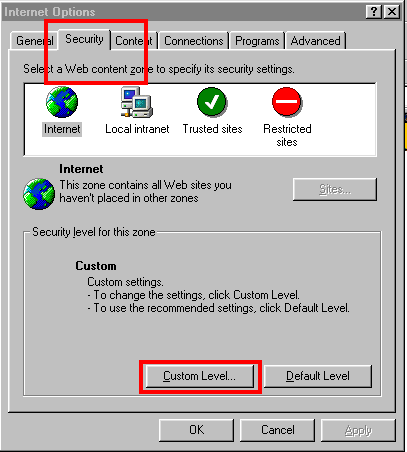 |
Click on the Secutity Tab and select Custom Level. |
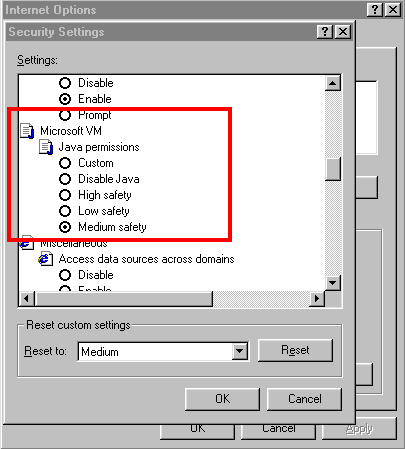 |
Scroll down to this area and make sure that you have Medium checked. |
Click OK and Apply. If after doing this you still can't see the Panos, then you will need to download the Plug-in. Microsoft quit pre-installing Java after Sun Microsystems (the developer of Java) successfully sued them. Here is a link to the Microsoft plug-in . This plug-in is on this site. You can check it for viruses before installing it. If you are not comfortable with this, then go to the Sun Microsystems site and download theirs. Many sites use this Plug-in so you might as well get it. |
|